Reading Garmin ERA crash reports from the command line
ERA is Garmin's crash reporting for published Connect IQ apps, and most
people use it as a panel in the Monkey C extension for VS Code or Cursor, under
MonkeyC: Open ERA Viewer. The SDK also installs a command-line
binary called era, in the same bin folder as monkeyc and monkeydo, and I have not seen it documented or mentioned anywhere. This is how to make it answer, so a script or a coding agent can pull a published app's crash reports and read them without opening an editor.
Start here
The app's UUID is the id in its store page address,
https://apps.garmin.com/apps/<uuid>. Copy the whole of it.
The app id in your manifest is a different number and will not work here.
The SDK path is in current-sdk.cfg, a one-line file holding the
path of the SDK version currently selected in the SDK Manager, which moves with
every release.
sdk="$(tr -d '\n' < ~/Library/Application\ Support/Garmin/ConnectIQ/current-sdk.cfg)"
"$sdk/bin/era" -a <full-app-uuid>
That prints a JSON array to stdout and writes no files, and -h
is the only other flag. Each element of the array is one group: one fault, with
every user who hit it folded into it. The VS Code extension does not have to be
installed for any of this.
Here is one group as it arrived, shortened.
[
  {
    "errorName": "Out Of Memory Error",
    "occurrenceCount": "...",
    "externalAppVersions": ["1.7"],
    "appVersions": ["..."],
    "firstOccurrence": "...",
    "lastOccurrence": "...",          // counts and timestamps cut from this paste
    "languageCodes": ["jpn"],
    "products": [
      { "product": "006-B4376-00", "firmwareVersions": ["27.18"] }
    ],
    "translatedBacktrace": [
      { "file": "/Users/build/Astral/source/Shared/Helpers.mc",
        "line": 478, "symbol": "getComplicationLabel" },   // the build machine's own path
      { "file": "/Users/build/Astral/source/Shared/Settings/SettingsView.mc",
        "line": 31, "symbol": "generateSubmenu" },
      { "file": "/Users/build/Astral/source/Shared/Settings/SettingsDelegate.mc",
        "line": 14, "symbol": "onSelect" }
    ]
  }
]
The same group through the printer at the end of this article:
$ "$sdk/bin/era" -a <uuid> | python3 era_report.py
========================================================================
Out Of Memory Error
  version : 1.7
  langs   : jpn
  device  : fēnix® 7X Pro                      fw 27.18
  backtrace (order is approximate under -O 3p):
      Astral/source/Shared/Helpers.mc:478                    getComplicationLabel
      Astral/source/Shared/Settings/SettingsView.mc:31       generateSubmenu
      Astral/source/Shared/Settings/SettingsDelegate.mc:14   onSelect
Trust the function chain, not the line number. The store export builds with
-O 3p, the optimiser level that inlines, so frame order is
approximate and a line can land a few lines off inside the right function. Line
478 above is the declaration of getComplicationLabel rather than a
statement inside it. The numbers also belong to the revision that built the
upload, so check whether the file has moved since that release before you go
looking.
products[].product is a part number rather than a device name,
and the printer resolves it against the compiler.json files under
~/Library/Application Support/Garmin/ConnectIQ/Devices/.
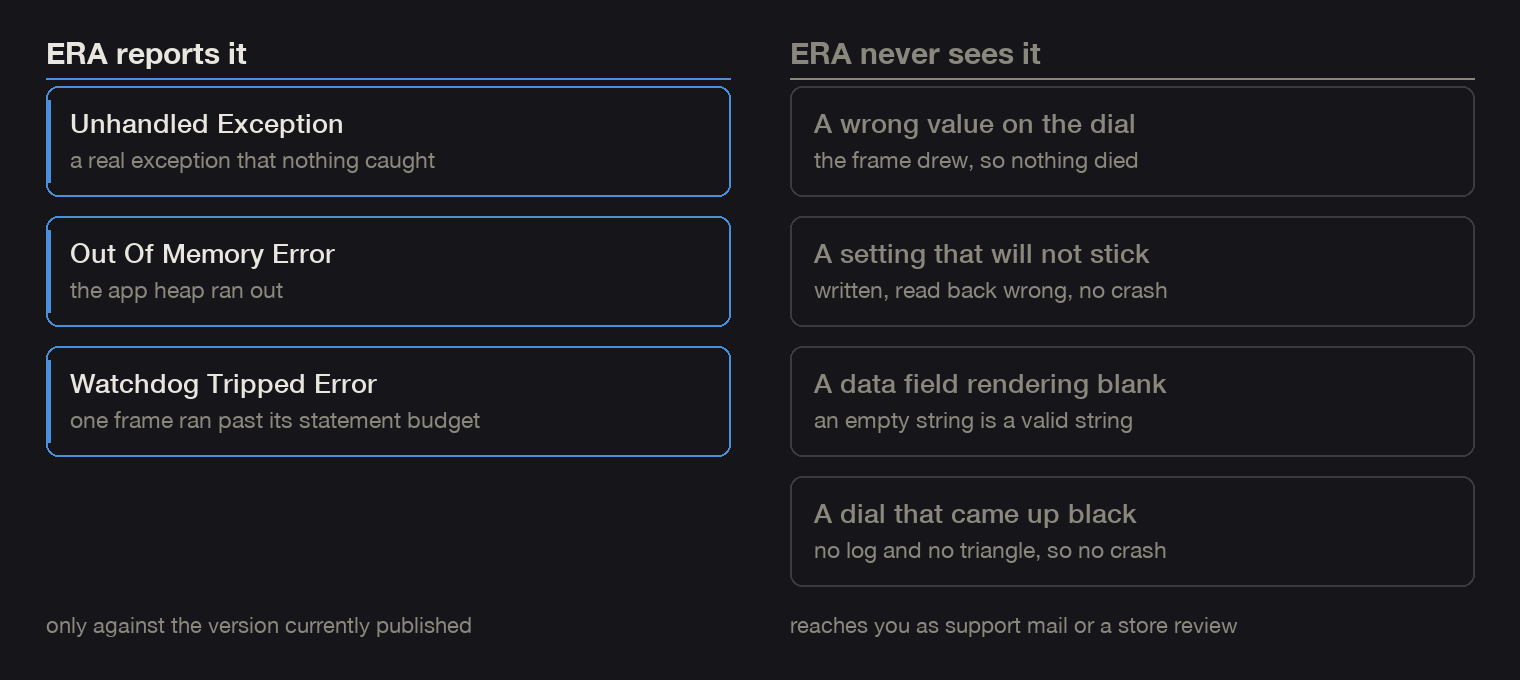
ERA only covers the build that is published now. A report older than your last release is not there, and that absence is not evidence the crash stopped.
A fault that does not kill the app produces no report at all, so a low count says nothing about how many people are unhappy. Read it next to support mail and store reviews.
Which errors a catch can stop, and which it cannot
Read errorName before the backtrace, because the two classes
need opposite fixes. Monkey C compiles to bytecode that a virtual machine on the
watch runs, and some faults are raised by that machine rather than thrown by
code.
Unhandled Exception is a real exception. A catch
around the call stops it and e.getErrorMessage() names it:
UnexpectedTypeException, OutOfGraphicsMemoryException,
and the rest of the throwing API surface. Drawing a null bitmap, drawing with a
null font, and comparing null against a number are all catchable. This is the
complication icon in Activity Graph, where the bitmap lives in the graphics pool
and the pool can drop it between frames:
// ActivityGraph/source/App/TimeField.mc, simplified from drawForegroundObjects
if (icon != null) {
    try {
        // getWidth loads the pool reference and throws when it cannot be restored
        dc.drawBitmap(rightEdge - textWidth - icon.getWidth(), iconY, icon);
    } catch (e) { }
}
Invalid Value, Array Out Of Bounds and
Symbol Not Found are VM errors. No try block sees them
and the app dies inside the try. Measured in the simulator, each
statement sitting in a try { } catch (e) { } that never fired once:
dividing by zero kills the app in every combination of Number and Float, and so
does modulo by zero. dc.setPenWidth with anything under 1 kills it
too, whole number or not, so 0.99 is fatal and 1.902
is fine. Indexing an array at its own size does it, and so does calling
.size() on something that has no size.
The only guard is an if in front of the operation. Every stroke
width in these faces goes through one helper, because the widths are computed
from screen geometry and 1.5 * DPI comes out at 0.951 on the
smallest DPI bucket:
// Shared/Helpers.mc, simplified: the real one also accepts Double and Long
static function safePen(dc, width) {
    if (!(width instanceof Number || width instanceof Float)) {
        dc.setPenWidth(1);
        return;
    }
    var w = width.toNumber();
    dc.setPenWidth(w < 1 ? 1 : w);
}
For one error name the chain itself is unreliable. Under -O 3p
the resolver lands on neighbouring symbols often enough that an
Invalid Value group can list functions no code path in the face can
reach. Trust the outermost frame and the error name there, and check the rest
against the source.
A group's details can also read Could not find symbol and eight
hex digits. That is a symbol id in the SDK's own table.
printf '%d\n' 0x008000ae                                          # 8388782
grep -o '<entry[^>]*id="8388782"[^>]*>' "$sdk/bin/api.debug.xml"  # size
Attributes in that file are in alphabetical order, so field= and
method= can come before id=; match the id anywhere in
the tag rather than at the start.
On a watch face the usual cause is a COMPLICATION_TYPE_*
constant that exists in your SDK and not on the runtime you are running on.
Those constants carry API levels and the faces ship to runtimes years apart. A
missing symbol is a VM error, so a try around the complication scan
does not save you, and the type checker cannot help because it checks against
the SDK. Read anything above roughly API 4.2 through a has guard
into a local first.
// Deco/source/App/DecoState.mc, in scanComplications
var sleepType = (C has :COMPLICATION_TYPE_SLEEP_SCORE)
    ? C.COMPLICATION_TYPE_SLEEP_SCORE : -1;   // -1 matches no real complication type
if (comp.getType() == sleepType) { sleepId = comp.complicationId; }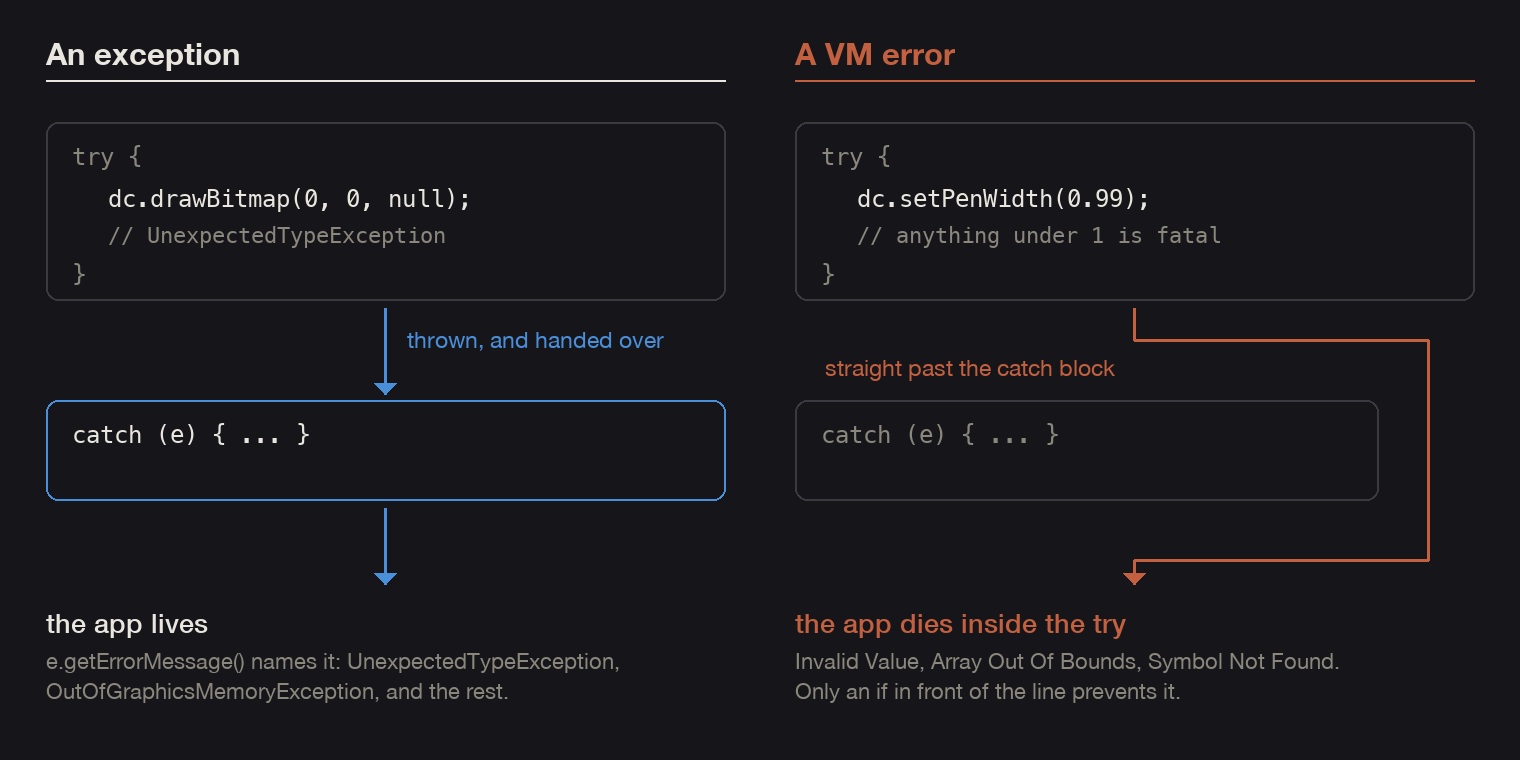
The two crashes
Both arrived on 6 and 7 September, against the builds that are published now.
Stardome ran out of memory in its own settings menu
fēnix 7X Pro, firmware 27.18, app version 1.7, Japanese, and the chain printed above.
onSelect fires when a row in the face's on-watch settings is
tapped, generateSubmenu builds a Menu2 and adds one
MenuItem for every value that row can take, and
getComplicationLabel produces the text on each item, either a
loaded string resource or the complication's own longLabel. Four of
Stardome's rows are data-field slots, and the value list for each one is
[:Hidden] plus every complication id the watch enumerated at
startup. All of that is allocated in the app heap, which is about 124 kB on every
Connect IQ product, with the running face already sitting in it.
What to check: how many items that submenu builds on that watch, and what one label costs in Japanese, since the labels for the fixed options are loaded string resources.
Activity Graph was killed by the watchdog on a Forerunner 255
Forerunner 255, firmware 29.05, app version 1.6, English,
Watchdog Tripped Error - Code Executed Too Long, chain
TimeField.drawNotification:150 under drawIcon:128
under drawNotificationRow:118 under
drawForegroundObjects:93 under
DrawableItems.drawForegroundObjects:51 under
GenericView.onUpdate:147.
The watchdog counts VM statements rather than wall time, and its kill lands
wherever the counter ran out, so the crash site tells you very little. Line 93 is
the last statement of drawForegroundObjects, and before reaching it
the same function has drawn the time and the day of week, read the complication,
re-resolved its icon, formatted its value and measured that text. The fr255 gets
120,000 statements where every other product these faces ship to gets 240,000,
in Devices/<device>/simulator.json under
watchdogCount.
What to check: everything the frame did before that line.
Sys.getTimer() does not track instruction count, so a stopwatch
cannot confirm a watchdog fix, and the only test is whether the same scenario
still dies.
What goes wrong with the tool
| what to check | how it shows | the fix |
|---|---|---|
The location key | era dies before it looks at your credentials, with java.lang.NumberFormatException: Cannot parse null string at CredentialsHandler.getServerFromConfigFile. A fresh install has no location in sdkmanager-config.ini. | Back the file up, the SDK Manager writes to it too, then append a location=0 line to it. 0 is PRODUCTION, 1 STAGE, 2 TEST. |
| The UUID | The app was not found. Please check the app id. The API also rejects the first eight characters on their own, with 418 ... is an invalid app UUID. | Paste the whole id out of the store page address. The login is fine when you get this message. |
| The account | You are not authorized to download crash report for the app. on the very first call. The machine holds one signed-in account at a time. | Compare developerId from /apps/<uuid> against the account signed in to the SDK Manager, and sign in as the one that owns the app. The developer key that signs your builds has no bearing on this. |
| The keychain write | The same message, but only after a first call that worked. era renews its token on every run and writes it back to the macOS keychain, and from a sandboxed shell that write fails without an error. A shell inside an editor's agent or a sandboxed tool is sandboxed; a normal Terminal window is not. | Run era from an ordinary Terminal window. Signing in again buys one more call, which is the tell. |
| The SDK Manager itself | The token cannot be renewed at all, and sdkmanager-location.cfg still points into the install image at /Volumes/Connect IQ SDK Manager/SdkManager.app/. | Install the app instead of running it off the disk image. While that path is unmounted nothing on the machine can renew a token, and the VS Code panel fails the same way. |
| An empty result | era prints []. | Nothing to do. You are authorized and nothing crashed in the published build. |
From a report to a reproduction
The chain is the useful part of a report, so use it to force the same state in the simulator instead of guessing.
- Reproduce on a device from the
productslist. The Forerunner 255 report is a good example, because the statement budget of that watch is most of the story. - Confirm the simulator's
CIQ_LOG.YML, under$TMPDIR/com.garmin.connectiq/GARMIN/APPS/LOGS/, shows the same function chain. It is already resolved to file, line and function, and the simulator draws the IQ triangle on the watch. If the chains match, you have reproduced the field bug and not a lookalike. If the face is black and there is no log and no triangle, it did not crash and you are chasing something else. - Fix, run the same forcing steps again, and confirm the log stays empty.
Temporary probes are the fastest way into step 1. Call a handler early, stub an API so it returns an empty list, or force the ordering the report implies. Revert every one of them and grep for the marker before you commit. Driving the simulator is a separate subject, and I wrote it up in shooting store screenshots from the simulator.
The files
Both of these are what I run, with my paths and ids taken out.
- era-SKILL.md, the notes: the prerequisites in the order they fail, the backtrace caveats, and the store API calls that list every app id on an account when you have not written the UUID down.
- era_report.py, the printer: sorts groups by occurrence count, resolves part numbers against your installed device folders, shortens the build machine's paths.
Frequently asked questions
Can I get a crash report from a watch face that is not on the store yet?
Not through ERA, which only covers published apps. Sideload the build instead and take the log off the watch afterwards: CIQ_LOG.YML and CIQ_LOG.BAK are in GARMIN/APPS/LOGS on the watch's own storage. Firmware problems are a different file, GARMIN/Debug/err_log.txt. That log holds program counters rather than function names, so you need the debug xml that matches the exact binary you flashed. Archive it with every build, or rebuild with -r -O 3p -l 2.
The author builds the My Day 24 watch face family. Published 2026-09-09.