Automating Garmin store screenshots from the Connect IQ simulator
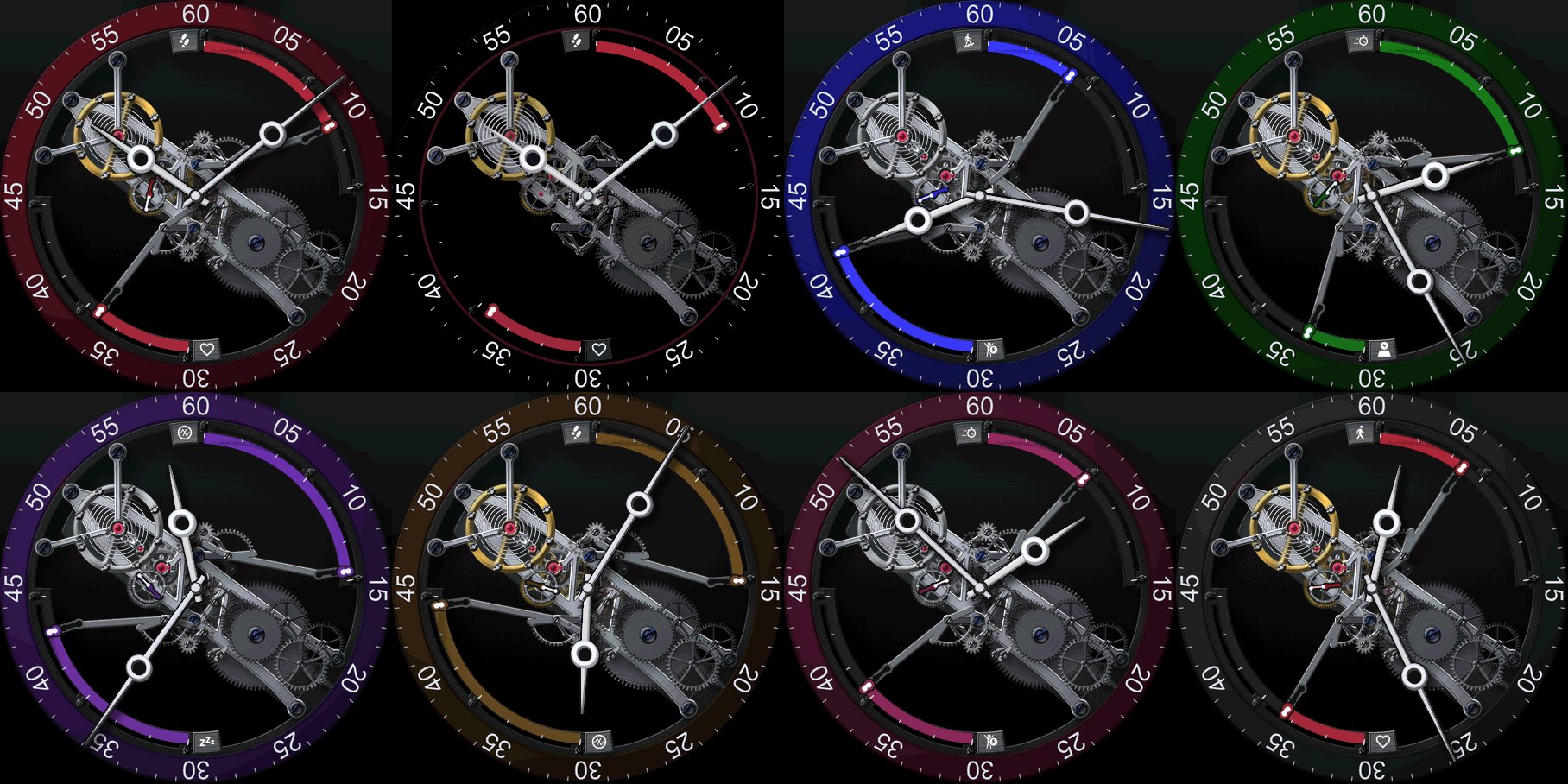
A store listing wants a gallery of the watch face: the dial in each colourway, at different times, with different data on it, and one frame showing what it looks like in always-on. The store shows five of them. Skeleton Bridge's list is nine, the five for the store and four more for its page on this site. Taking them by hand is build, wait, capture, change a setting, build again, and it takes an evening. Then one colour changes and it takes another evening.
So I wrote a script. It takes a watch face's whole store gallery in the Connect IQ simulator, one build per picture, from a list the face keeps in its own folder. For each picture it sets the clock, sets the two data readings the dial shows, sets the face's own settings, builds and deploys, sets the battery charge, switches the display mode when that shot is the always-on one, and saves the frame through the simulator's File > Save Screen Capture. Nine pictures is about five minutes, and nobody has to sit at the keyboard for it.
There are two Python files. sim.py drives the simulator and
can take a single picture. shoot.py sits on top of it and works
through a face's whole list.
# one picture, to look at something
python3 sim.py --face Truss --time 10:8:32 --gauge 44,71 \
    --set Colourway=1 --set Plating=1 --battery 62 --mode active \
    --out ~/Desktop/one.png

# the whole gallery, from the face's own shot list
python3 shoot.py --face Truss
--face names the face folder, and without it both scripts
use the face folder you are standing in. shoot.py --list prints the
list without building anything, and --only 2 truss-5-violet-rhodium
retakes by number or by name.
Two things to do before the first run. Install Pillow, which is what reads the saved frames back for measuring. And the first time the script clicks a menu, macOS asks whether your terminal may control other apps, under Accessibility in System Settings. It asks once. Until you say yes, none of the menu clicks do anything.
The shot list
The list is the face's own file, store-assets/shots.json.
Three of Skeleton Bridge's nine, as they sit in it:
{
  "device": "venu3",
  "shots": [
    {
      "name": "truss-1-oxblood-gilt",
      "why": "the dial as it ships: default colour, default metal, default sources",
      "set": {"Colourway": 0, "Plating": 0, "Metric1": 11, "Metric2": 3},
      "time": "10:8:32", "gauge": "44,71", "mode": "active"
    },
    {
      "name": "truss-2-always-on",
      "why": "the same dial at night, which is the one thing a still cannot imply",
      "set": {"Colourway": 0, "Plating": 0, "Metric1": 11, "Metric2": 3},
      "time": "10:8:32", "gauge": "44,71", "mode": "aod"
    },
    {
      "name": "truss-3-blue-rhodium",
      "why": "the other metal, against the first shot's gilt",
      "set": {"Colourway": 1, "Plating": 1, "Metric1": 0, "Metric2": 5},
      "time": "8:16:41", "gauge": "78,40", "mode": "active"
    }
  ]
}| field | what it sets | where the value comes from |
|---|---|---|
device | the simulator device the whole gallery is shot on | one entry at the top of the file, not one per shot; an SDK device name, venu3 here |
name | the file name the picture gets | mine are numbered so the gallery keeps its order |
why | nothing in the run | a note to myself, printed by --list |
set | the face's own settings, in resources/settings/properties.xml | the property ids and the numbers that face already uses |
time | the clock on the dial, as H:M:S | a time where the hands sit well and nothing important is covered |
gauge | the two data readings the dial shows, as value1,value2 in percent | whatever makes the dial look like a watch in use |
mode | active for a lit frame, aod for the always-on one | one shot in a gallery is usually aod |
A shot can also carry a battery figure, and without one it
gets whatever charge the simulator is on. The file is checked before anything is
built. A shot with no name, time or gauge, a battery outside 0 to 100, or two
shots sharing a name stops the run there.
The why field is what stops a gallery from turning into nine pictures of the same dial in different colours.
How one picture is taken
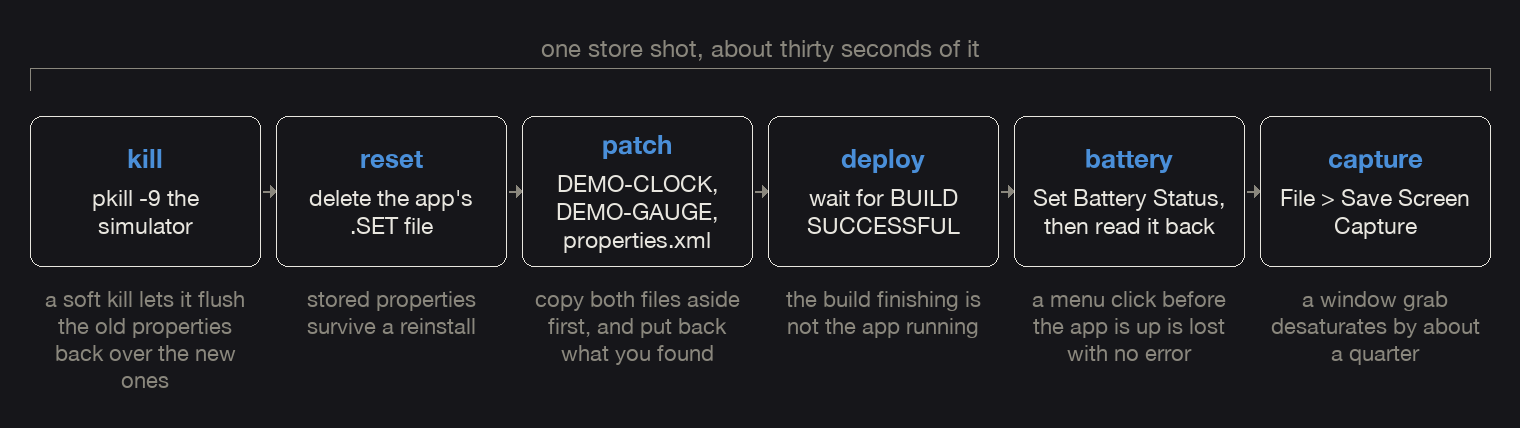
Kill the simulator. It writes the running app's property and
storage tables back to disk when the app is killed, and a monkeydo redeploy
counts as killing it. So anything deleted while it was running comes back with
the old values. pkill -9 first, and everything else after.
Delete the app's data files. The settings file and the storage files, out of the simulator's own temp folder. Without that, the properties the last shot used are still there and the freshly patched defaults never get read.
Patch the face's source. The clock and the two readings are set in the face's own source, on two lines of constants that carry anchor comments. They are part of
the shipping code, and a -1 means use the real value, so nothing has
to be added before a run or stripped before a commit.
// in the face's own dial file, permanent, -1 means "use the real clock"
public static var DH = -1, DM = 0, DS = 0;   // DEMO-CLOCK
public static var DG1 = -1, DG2 = -1;        // DEMO-GAUGE
The script matches the shape of those two lines rather than the names on
them, so every face keeps whatever it called its variables. A face needs those
two comments and nothing else to work with the script. Settings are patched in
resources/settings/properties.xml, where the match is on
<property id="Colourway" type="number"> and the number between
the tags. If a shot names an id the face does not have, the run stops before
anything is built.
Build and deploy. Every face folder here has a
start_simulator.command that builds the .prg with the
SDK compiler and deploys it into the running simulator with
monkeydo. The script runs it
with the device as its argument, sends the output to a log file, and reads that
file until it says BUILD SUCCESSFUL or prints an error. It also
reads the .prg name out of that launcher, which is how it knows what
the simulator's data files for this face are called. If you do not have such a
script, any script that builds, deploys and prints the build output will do.
Set the battery. After the deploy, never before, because killing the simulator took the old value with it. Settings > Set Battery Status has two fields, the charge in percent and a days-remaining figure. The battery icon on the dial is picked from the watch's own charge, so a charge faked through the gauge anchor would disagree with the icon beside it.
Take the picture. File > Save Screen Capture writes the framebuffer at device resolution, straight into a file you name.
All the menu work is AppleScript, against a process System Events calls
simulator, in lower case. The capitalised Simulator is
Apple's iOS one.
Two things out of sim.py turn up in every sample below. One
is the Face object, which is everything the script reads out of a
face folder:
class Face:                # simplified from sim.py, read once per run
    dir = '/watches/Truss'                                 # the face folder
    dial = 'source/App/TrussDial.mc'                       # the file with the anchors
    touched = (dial, 'resources/settings/properties.xml')  # the files a run rewrites
    scratch = '/tmp/truss-sim'                             # frames, the deploy log
    saved = '/tmp/truss-sim/saved'                         # copies, until the run ends
The other is osa(), which is the whole of the remote
control. One AppleScript in, a success flag and whatever it printed out.
def osa(script):
    """Runs one AppleScript and hands back (it worked, what it said)."""
    r = subprocess.run(['osascript', '-e', script],
                       capture_output=True, text=True)
    return r.returncode == 0, (r.stdout + r.stderr).strip()
What went wrong on the way here
A window grab is not the picture. screencapture -l on
the simulator window loses about a quarter of the mean saturation against the
framebuffer, and it picks up a few case pixels around the edge. Luma is
untouched, so only the colour changes, and that is why it survives a review.
Nothing looks broken, the gold is just greyer. So every frame goes through File
> Save Screen Capture, which is already device pixels, with nothing cropped
out of a case and nothing resampled.
Typing into the save dialog loses keystrokes. A path typed into
Save As: does not navigate anywhere. It is saved as one filename
with the slashes turned into colons. So both fields are set by value instead.
Cmd-Shift-G, set the Go to Folder sheet's field, one return, then set
Save As:. There is one more thing in the way. After a simulator
restart the save panel comes up compact, and Go to Folder cannot reach the fields
there, so the show more options control has to be clicked first.
-- sim.py's SAVE, in full. The two %s are the folder and the file name.
tell application "System Events" to tell process "simulator"
  set frontmost to true
  click menu item "Save Screen Capture" of menu 1 of menu bar item "File" of menu bar 1
  delay 2.5
  set w to window "Save"
  set g to splitter group 1 of w
  repeat with e in UI elements of g
    if description of e is "show more options" then
      click e
      delay 2.0
    end if
  end repeat
  keystroke "g" using {command down, shift down}
  delay 1.5
  set value of text field 1 of sheet 1 of w to "%s"
  delay 0.8
  keystroke return
  delay 1.5
  if (count of sheets of w) is not 0 then error "the Go to Folder sheet stayed open"
  set value of (first text field of g whose description is "text field") to "%s"
  delay 0.8
  click button "Save" of g
  delay 2.0
end tell
The folder and the name reach it by plain string formatting, one line up in the Python:
ok, msg = osa(SAVE % (folder, name)) # sim.py, in framebuffer()A swallowed keystroke leaves the Go to Folder sheet open, and an open sheet breaks the next run as well. That is how I lost three captures in a row. The script now closes whatever the save left standing after every attempt, good or bad, and prints how many clicks that took.
A menu click before the app is up is lost, with no error.
BUILD SUCCESSFUL means the build finished, not that the face is
running. I ran the same click and the same script twice and changed only the
wait. The always-on frame from a click right after BUILD SUCCESSFUL
came out at nearly three times the mean luma of one taken after the app was
really up. It was still the lit frame.
So the script waits. Ten seconds after a deploy before it opens a menu, twelve before it takes a frame, and nine more after a display mode switch. And it reads back what it set wherever the simulator lets it, which for the battery is the same sheet that set it.
def set_battery(percent):                  # simplified from sim.py
    time.sleep(10)                         # the app is up well after BUILD SUCCESSFUL
    osa(BATTERY % (percent, 3.0))          # Settings > Set Battery Status
    time.sleep(1.5)
    ok, reading = osa(BATTERY_READ)        # the same sheet, reading field 1
    if not ok or abs(float(reading) - percent) > 0.5:
        print('  BATTERY DID NOT TAKE - reads %s, wanted %s' % (reading, percent))
        return False
    return True
There is one more cause of the same symptom, and it has nothing to do
with the simulator. If the Mac's display goes idle the whole GUI path stops
working, the click returns, osascript exits 0, and no file is
written. Start one caffeinate -dims -t 21600 & for the session,
not one around each command, or the machine can still sleep between them.
The simulator remembers everything between runs. A changed default
in properties.xml does not show up in a fresh deploy, because the
simulator keeps the app's settings file across reinstalls. File > Reset All
App Data clears that file, and it leaves Application.Storage alone,
so a one-time latch written into storage survives the reset and the face goes on
resolving its old defaults. Deleting the files by hand while the app is running
does not help either, since they are written back with the old values when the
app is killed.
# <APP> is the .prg name without the extension, in capitals
pkill -9 -f "MacOS/simulator"
rm "$TMPDIR"/com.garmin.connectiq/GARMIN/APPS/SETTINGS/<APP>.SET
rm "$TMPDIR"/com.garmin.connectiq/GARMIN/APPS/DATA/<APP>.DAT
rm "$TMPDIR"/com.garmin.connectiq/GARMIN/APPS/DATA/<APP>.IDX
The simulator keeps its display language the same way, which is how a whole gallery of mine came back with the weather word in Czech, left over from a translation I had been reading the day before.
The script once destroyed uncommitted work. An early copy of it
undid its own edits with git checkout --. Twice. A script that
rewrites your source has to put back the file it found, not the version in the
last commit. Get that wrong and you spend a whole simulator round chasing a fault
that is no longer in the code.
def stash(face):                # sim.py, before the first edit of a run
    for rel in face.touched:    # the dial file and properties.xml
        copy = os.path.join(face.saved, rel.replace('/', '_'))
        if not os.path.exists(copy):
            open(copy, 'w').write(open(os.path.join(face.dir, rel)).read())


def revert(face):               # sim.py, called from shoot.py's finally
    for rel in face.touched:
        copy = os.path.join(face.saved, rel.replace('/', '_'))
        if os.path.exists(copy):
            open(os.path.join(face.dir, rel), 'w').write(open(copy).read())
            os.remove(copy)
A run that finds a stash already sitting there refuses to start. That
copy is from a run that was killed, it holds older source, and reverting onto it
later would destroy newer work the same way the git checkout did.
Commit before a simulator round anyway.
The always-on shot, and a check that can fail
An always-on shot is two frames. Take the lit one, click Settings > Display Mode > Always-On, wait, take another, click back to High Power. The lit frame is kept only to compare against.
The order of those clicks matters. Never deploy into a simulator that is already in always-on. The app comes up dead, the screen stays black in both display modes, and the next deploy into that simulator is black too. A face that is fine on a watch behaves the same way here, so there is no bug in the face to find. Deploy in High Power, then switch.
Then the check. The obvious check is that the always-on frame is not identical to the lit one, and it proves nothing. It passes on a single moved pixel, and even when the Display Mode click does nothing the seconds hand has still moved. It once passed a fully lit frame as an always-on one. That frame's luminance was two and a half times the real always-on figure, and I only noticed because the number was absurd.
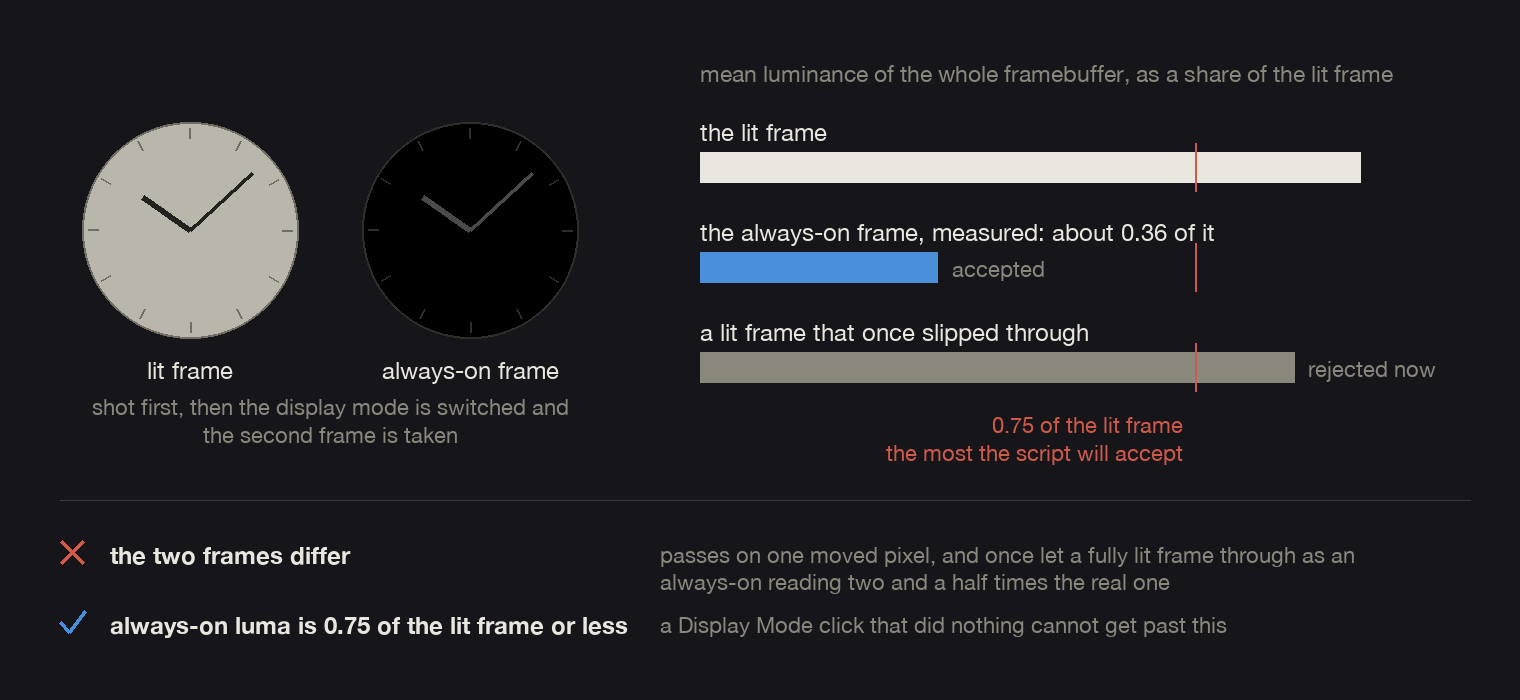
So the check is mean luminance over the whole framebuffer, and the always-on frame has to come in well under the lit one. Three quarters is the limit in the script, where the real ratio is about a third. The limit is loose on purpose. It is there to catch a click that did nothing, and the number that certifies an always-on frame comes from File > View Screen Heat Map instead.
def capture_aod(face, dest):            # simplified from sim.py's capture()
    lit = os.path.join(face.scratch, 'before-aod.png')
    framebuffer(face.scratch, lit)      # File > Save Screen Capture, writes lit
    osa(MENU % 'Always-On')             # Settings > Display Mode > Always-On
    time.sleep(9)
    ok = framebuffer(face.scratch, dest)
    osa(MENU % 'High Power')
    if ok and luma(dest) > luma(lit) * 0.75:
        print('  ALWAYS-ON DID NOT ENGAGE - %.2f%% against the lit %.2f%%'
              % (luma(dest), luma(lit)))
        return False
    return ok
framebuffer() saves one frame under the name it is given and
returns whether the file landed. luma() is the measurement, over
every pixel of the frame:
def luma(path):                         # mean over the whole framebuffer, percent
    px = list(Image.open(path).convert('RGB').getdata())
    return sum(r * .299 + g * .587 + b * .114
               for r, g, b in px) / len(px) / 255.0 * 100.0
What the simulator will never show you
Four things a gallery run cannot tell you, whatever the pictures look
like. Two of them want a word first. The watchdog counts the VM statements a face
spends in one draw and kills the face when it goes over. The graphics
pool is the separate block of memory a face's textures live in, sized per product by
graphicsResourcePoolSize.
| what | in the simulator | on a watch |
|---|---|---|
| the low-power watchdog budget | the active budget is enforced faithfully | the reduced low-power budget is not enforced at all, so a frame that runs fine in the simulator can still be killed on the watch at night |
| compositing | the blit is a synchronous copy and the frame comes back whole | the GPU composites the screen when onUpdate returns, so a texture cleared and repainted later in the same call gets sampled half drawn |
| translucent fills | drawn at desktop speed; an A/B here had an alpha fill costing what a solid one costs | the same alpha polygon frames ran at 2-3 FPS on a Venu 3S, against about 30 for a face with no per-frame alpha |
| the graphics pool | graphicsResourcePoolSize is enforced, and a probe can read the free figure, at about 90 seconds a product | the pool evicts to satisfy a request instead of refusing it, so a probe asking for a large buffer evicts the very data it was measuring and then reports the pool as free |
The pool is the one thing here the simulator does measure, and it is easy
to measure wrongly. Probe from onUpdate several frames in, never
from onLayout right after a big allocation, and read the number on
the wake frame, because a face's full-screen scratch buffer is live only while
something is being drawn into it. And a non-null return from
createBufferedBitmap means nothing, because it is lazy and the
allocation happens inside get().
The files
The three files as they run here, with my own paths and ids taken out. They are downloads, so you can read them in one piece.
- sim.py, the driver, one for the repo rather
than one per face. It takes
--face <Folder>or the face folder you are standing in, reads the.prgname out of that folder's launcher script, and finds the anchors in whichever source file carries them. If more than one file does, it stops rather than guessing. - shoot.py, the gallery on top of it, one
build per shot. It prints the count, the device and an estimate before it starts,
about thirty seconds a shot measured on a venu3, and the minutes left after each
one. It puts the sources back in a
finallywhatever happened, deletes the demo.prg, and writes both the raw frame and a copy at 454 square under the store's 150 kB limit. - shots.json, one face's whole list, the one quoted at the top of this article.
One step at the end belongs to you, not to the script. The build that
took the pictures has its clock pinned, so its seconds hand is dead and the dial
only redraws when the display mode changes. It looks like a face bug and has been
reported as one. Run python3 sim.py --revert if a single shot left
your sources patched, or let shoot.py restore them in its
finally, then deploy your normal build by hand.
Frequently asked questions
Why does the Connect IQ simulator show the wrong language in my screenshots?
Because it keeps the language it was last set to, across runs and across deploys. It is Settings > Language in the simulator's own menu bar, and nothing in a build changes it. My script does not touch it either, so it is the one thing to check by eye before starting a batch.
The author builds the My Day 24 watch face family. Published 2026-09-09.