Why my Garmin watch face went black: three causes in one month
A tester photographed his Venu 4 and sent the pictures over. Skeleton was on it and the movement had gone: the plate, the wheels, the whole lower half. The hands and the tourbillon cage were still turning, over solid black.
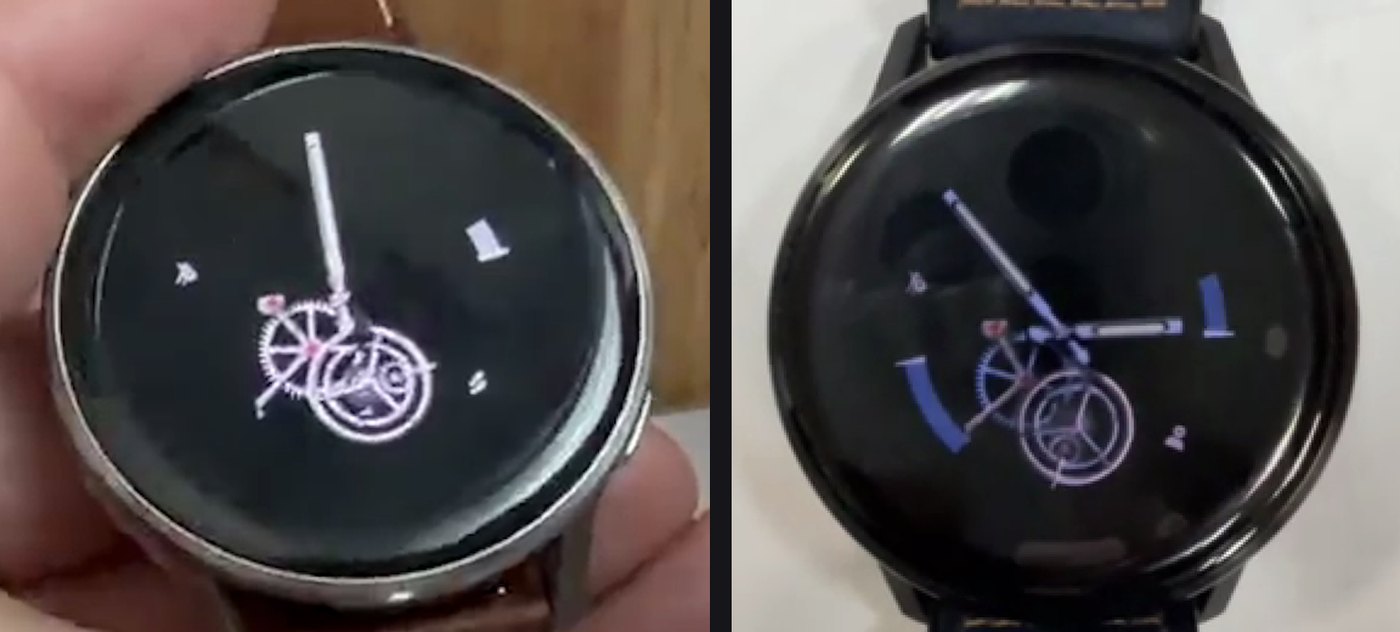
The same photograph had already reached me twice, from a fenix 8 owner on 16 August and a Venu 4 owner on 26 August. I found the cause both times, shipped a fix both times, and both owners wrote back to say it worked. Three reports, three causes, and the third had nothing to do with memory.
What a watch face is made of, in the words this post uses
This post assumes you have drawn a few things on a Garmin watch and no more than that. Here is every term it uses, in the order you will meet them.
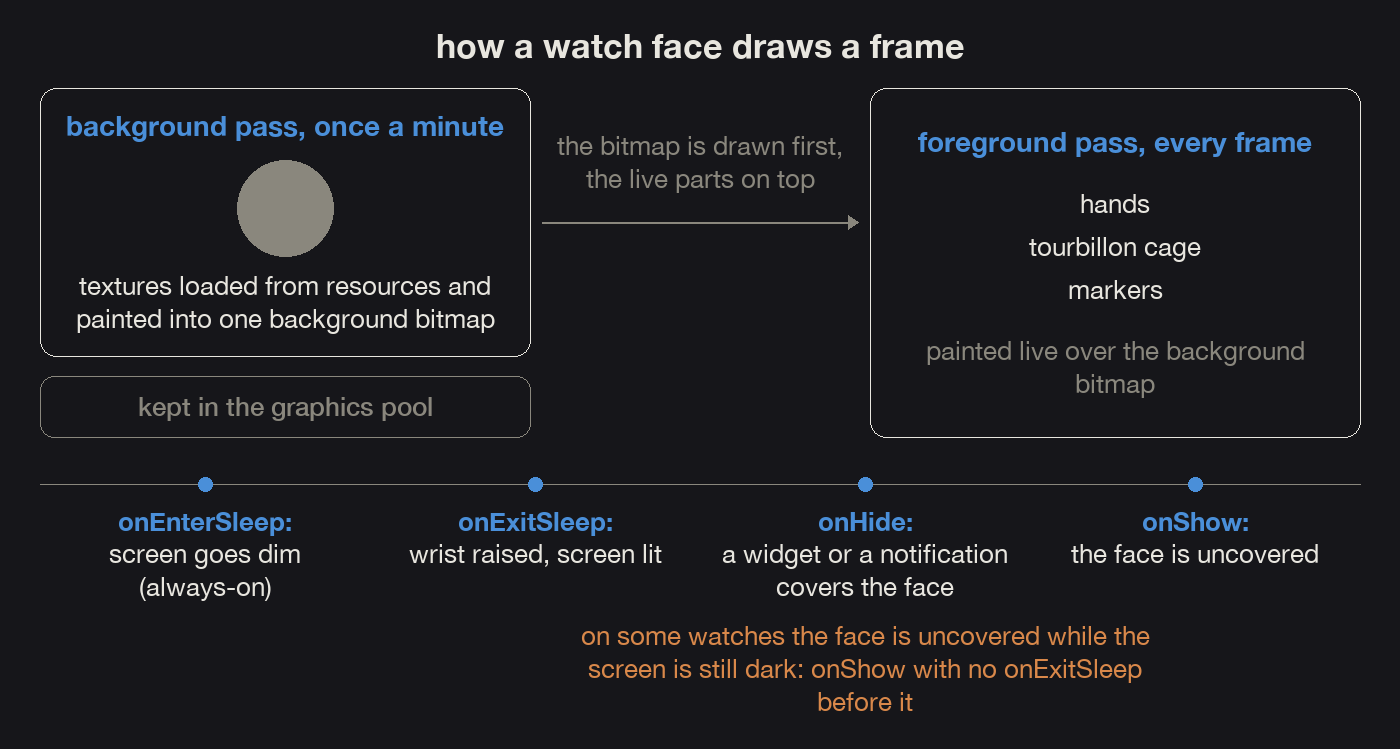
My faces draw in two passes. A simple watch face draws everything on every frame. A face with a lot of art cannot afford that, so mine cache the parts that stand still: the dial, the plate, the wheels, the printing. A slow pass draws those about once a minute into an off-screen bitmap that the face keeps. A fast pass runs on every frame: it copies that bitmap onto the screen, then paints the moving parts on top, the hands, the tourbillon cage, the markers. The cached bitmap is an optimisation, and it is what keeps these faces inside the watchdog's budget per frame.
That split explains the photographs above. The hands and the cage are painted fresh every frame, so they were still there. The movement lives in the background bitmap, so when something goes wrong with that bitmap the whole movement goes at once. All three reports in this post arrived as this same picture.
A texture is a picture that ships inside the app. On Connect IQ it is
a PNG in the resources folder. Ui.loadResource loads it into
memory, dc.drawBitmap puts it on the screen. I call them textures
rather than images because a face carries a lot of them and they are all in
memory together.
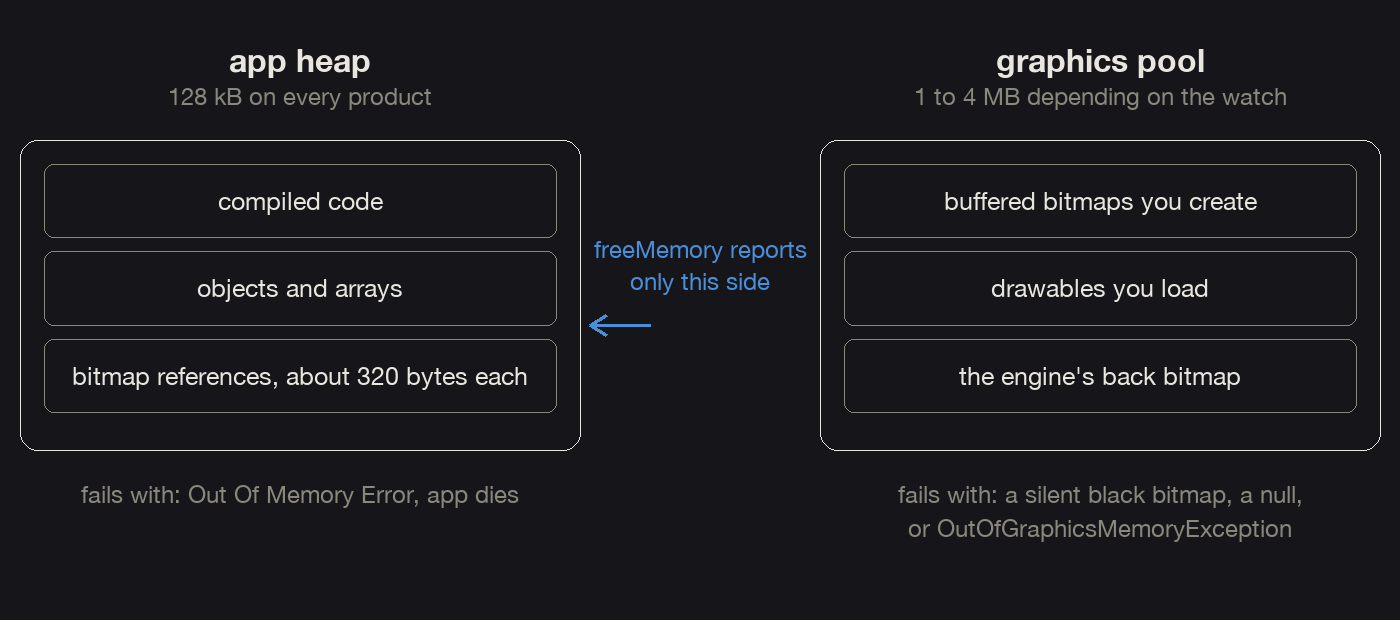
The watch has two separate memories. The app heap holds your compiled code and every object your code creates, and about 124 kB of it is usable. The graphics pool holds decoded pictures: the textures you loaded, and any off-screen bitmap you asked the system to make. Depending on the watch, the pool is 1 MB to 4 MB.
System.getSystemStats().freeMemory reports the heap. It cannot
see the pool at all. So a face can have plenty of heap free and still lose its pictures because the pool is full. The two do not even fail the same way. The heap dies with "Out Of Memory Error". The pool throws its own exception, OutOfGraphicsMemoryException, or hands back a bitmap with nothing in it and says nothing at all. The confusion comes from the other direction: work done for the pool, such as holding hundreds of references, can blow the heap, and then the heap's error looks like a pool problem. I have fallen for that more than once.
There is a third budget. It has nothing to do with memory and it kills a face just as dead: the watchdog, which limits how much work a single frame may do.
| budget | what it holds | limit | how it fails | how to see it |
|---|---|---|---|---|
| app heap | your compiled code and every object your code makes | about 124 kB usable | "Out Of Memory Error" | System.getSystemStats().freeMemory, and memoryLimit in the SDK's compiler.json |
| graphics pool | decoded pictures: the textures you loaded and the off-screen bitmaps you made | 1 MB to 4 MB, by watch | OutOfGraphicsMemoryException from get(), or a texture quietly draws as nothing | graphicsResourcePoolSize in the SDK's simulator.json; on the watch, allocate buffers until one really fails |
| watchdog | how much work one frame may do | a count of VM statements, set per watch | "Watchdog Tripped Error" | watchdogCount in simulator.json |
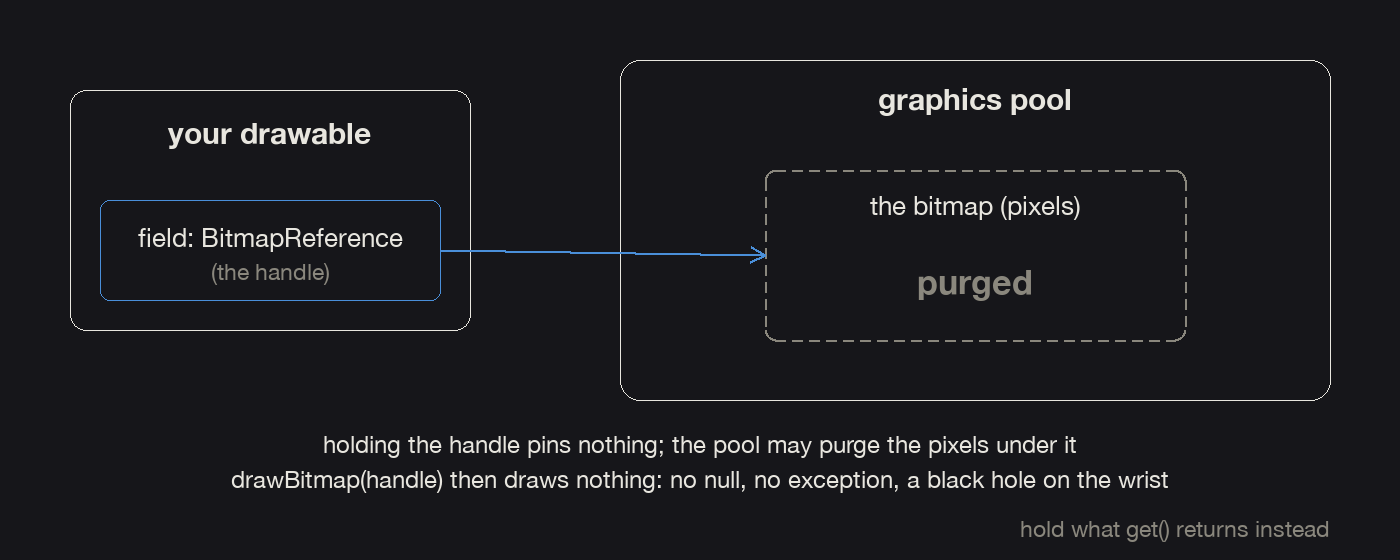
A BitmapReference is a handle, and the handle is not the
picture. Ui.loadResource gives you a handle. Calling
get() on it gives you the bitmap itself. If nothing in your code
holds that bitmap, the pool may throw the pixels away when it needs the room.
Your handle stays valid and points at nothing. That is the first fault in this
post.
Always-on is the dim mode. Put your wrist down and the watch does not switch the screen off. It leaves the face on the screen at low brightness and lets it repaint once a minute, under a limit on how many pixels may be lit. Raise your wrist and the watch goes back to full brightness and a frame a second.
The system tells a face four things, in two pairs that mean different
things. onHide and onShow are about being covered and
uncovered: a glance, a notification or the settings menu opens on top of the
face, then goes away again. onEnterSleep and
onExitSleep are about the screen: the watch drops into always-on
when your wrist goes down, and comes out of it when you raise your wrist.
The two pairs are independent. A face can be uncovered without the screen having woken up. That is the third fault in this post.
16 August: I kept the handle and the watch threw away the picture
| what the wearer saw | The movement gone. The hands and the cage still turning over black. |
|---|---|
| what was actually wrong | My field held a BitmapReference, which is only a handle. Nothing held the bitmap itself, so the pool was free to throw the pixels away. |
| what fixed it | Resolve the handle with get() and keep that object. Skip a texture that has gone missing, and load it again on the next background pass. |
| how it was proven | The same 4 MB pool filled twice. Resolved bitmaps all kept their pixels and the ninth request threw an exception. Unresolved handles all succeeded, and nine of twelve drew as black. The fenix 8 owner confirmed the fix the next day. |
The fenix 8 51 mm owner sent the first photograph. Ui.loadResource
hands back a BitmapReference, and my own notes said that holding
one of those keeps the bitmap alive. The SDK's ResourceReference page says the
opposite: the object "could be temporarily purged from the system memory pool
when all strong references are destroyed". The strong reference that counts is
one to the bitmap itself. My field held the handle and pinned nothing, so every
texture the face owned could be thrown out on any frame.
dc.drawBitmap(x, y, reference) on a purged bitmap draws nothing.
There is no null to check and no exception to catch. The frame just comes out
without it.
So I measured it, both ways, in the same 4 MB pool. Eight resolved full-screen buffers filled the pool and every one of them kept its pixels; the ninth allocation threw an exception. Then twelve unresolved ones went into the same pool, and every request succeeded. Nine of those twelve composited as solid black, next to the ones that had survived. Hold the resolved object and a failure comes back as an exception you can catch. Hold the reference and the pixels quietly disappear.
Version 1.5 resolves the reference in onLayout, keeps the
object get() hands back, and wraps the dereference in try/catch.
hidden function load(id) {   // loadResource throws when the pool is full
    try {
        return deref(Ui.loadResource(id));
    } catch (e) {
        return null;
    }
}

hidden function deref(ref) {   // null after an eviction, throws if no room
    if (ref == null) { return null; }
    try { return (ref has :get) ? ref.get() : ref; } catch (e) { return null; }
}
A texture that comes back missing is skipped instead of drawn, and loaded again on the next background pass. The fenix 8 owner confirmed it on 17 August.
// simplified from the face: one texture, held as the bitmap itself
hidden var _plate = null;   // null means gone, take it again

function onLayout(dc) {
    _plate = load(Rez.Drawables.Plate);   // resolved once, through get()
}

function drawBackgroundObjects(dc) {
    if (_plate == null) { _plate = load(Rez.Drawables.Plate); }   // re-take a missing one here
    if (_plate != null) { dc.drawBitmap(x, y, _plate); }          // never draw a hole
}

26 August: the graphics pool was full at the moment the watch woke up
| what the wearer saw | The same picture, on a Venu 4, on a build that already had the first fix in it. |
|---|---|
| what was actually wrong | The graphics pool ran out of room on the frame where the watch wakes. Both texture sets were resident together, because I had turned the scene swap on only for 3 MB watches. |
| what fixed it | The scene swap on every product, and the engine's own off-screen bitmap asked for 1-bit alpha, 2 bytes a pixel instead of 4. More than a megabyte back on a Venu 4. |
| how it was proven | A probe inside the running build, reading the free pool on the wake frame: 96 kB left on a Venu 4 and a venu3, none at all on a venu2. The Venu 4 owner confirmed the fix on 27 August. |
Ten days later the same photograph came from a Venu 4 45 mm, on a build that already carried the first fix. Every texture was resolved and held properly. The pool simply ran out of room at the moment the watch woke up.
Skeleton carries two sets of textures, one for the lit dial and one for the dim always-on frame. The fix at the time was a scene swap: free one set when the other is needed, so the two are never in the pool together. I had turned it on only for the products with a 3 MB pool. Four megabytes at 454 px felt like plenty, and the only product anybody had actually measured was my own venu3s, which has over a megabyte spare.
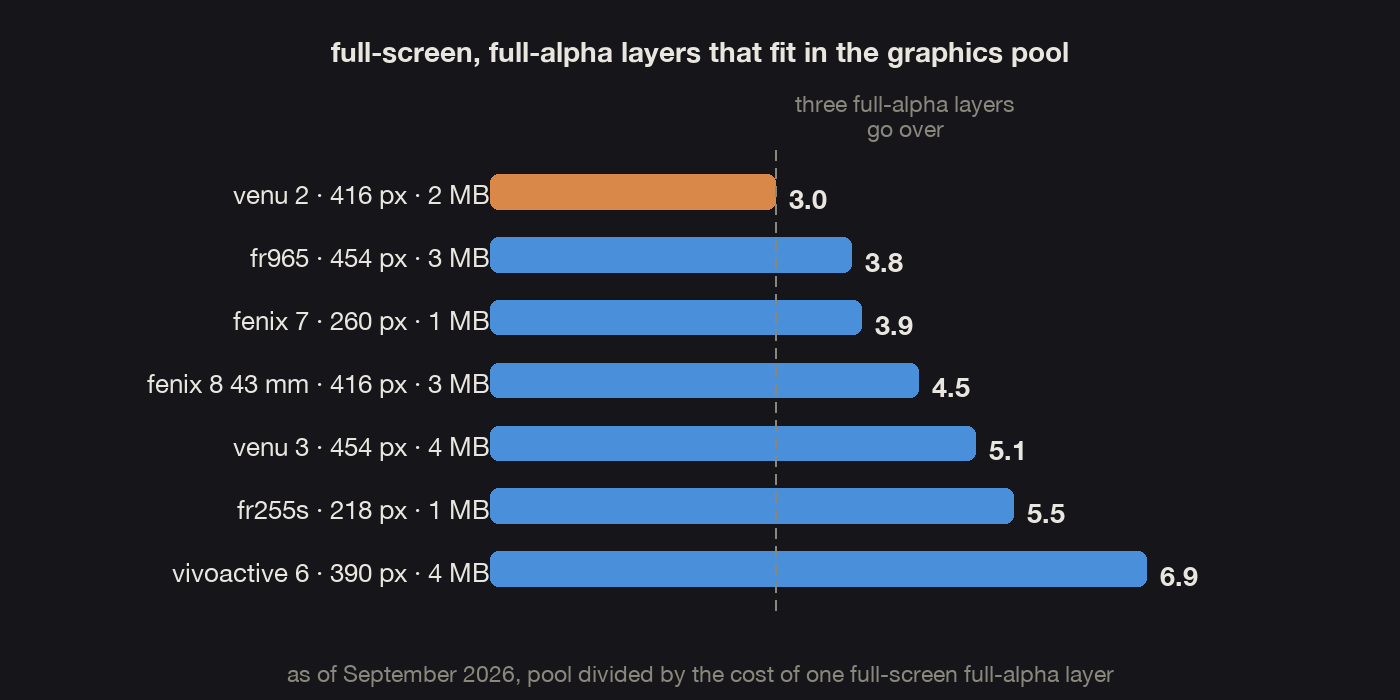
The number that matters is how many full-screen bitmaps fit in the pool, and that is the pool size divided by what one such bitmap costs. Counted that way, neither the screen size nor the pool size answers the question on its own. fr965 and venu3 have the same 454 px screen, one on 3 MB and one on 4 MB. venu2 has a smaller screen than both and less room than either of them: 416 px on 2 MB works out at three full-screen layers, and the engine's own composite bitmap takes one of them before any art is loaded. Three full-screen layers with a full alpha channel go over budget on a lot of watches. As of September 2026 four pool classes cover everything I ship to:
| pool | screens in this class | full-screen layers | examples |
|---|---|---|---|
| 1 MB | MIP, 218 to 280 px | 3.3 to 5.5 | fenix 7 and 7X, fr255, fr955, enduro 3, fenix 8 Solar |
| 2 MB | AMOLED, 360 to 416 px | 3.0 to 4.0 | venu 2 and 2 Plus, venu 2s, fr165, vivoactive 5, venu Sq 2 |
| 3 MB | AMOLED, 390 to 466 px | 3.6 to 5.2 | fenix 8 and 9, epix 2, fr265, fr965, fr970 |
| 4 MB | AMOLED, 390 to 486 px | 4.8 to 6.9 | venu 3 and 3s, venu 4, vivoactive 6, venu X1 |
Garmin adds watches and the classes stay, so I do not keep a product list
here. For a given face the list comes out of a script that reads that face's own
manifest.xml.
The cheapest saving came from a default in my own code that I had backwards.
An options dictionary with only :width and :height in
it gets you ALPHA_BLENDING_FULL, which costs 4 bytes a pixel where
ALPHA_BLENDING_PARTIAL costs 2. The engine's back bitmap only ever
holds an opaque composite, so it had been twice the size it needed on every
product.
_bmpPartial = _settings.backBitmapPartialAlpha
              && (Gfx has :ALPHA_BLENDING_PARTIAL);
_bmpOptions = { :width => w, :height => h };
if (_bmpPartial) {   // the default is ALPHA_BLENDING_FULL, 4 bytes a pixel
    _bmpOptions.put(:alphaBlending, Gfx.ALPHA_BLENDING_PARTIAL);
}
_bitmap = Gfx.createBufferedBitmap(_bmpOptions);
The mistake in the other direction is asking for PARTIAL where FULL was needed. PARTIAL is 1-bit alpha, so a pixel is either fully there or fully gone. On translucent artwork it gives you hard-edged cutouts that look like antialiasing switched off. That is what really broke Mandalis' textures the first time, and I spent a whole debugging session blaming the pool for it.
Getting a real number out of a watch took several attempts. Each attempt that failed was wrong in its own way, and all four are easy to fall into.
- Counting successful allocations measures nothing. The pool evicts under pressure instead of refusing, so it frees an older bitmap and gives you yours. 96 of them "fitted" in 2 MB.
- Keeping the references in an array repeats the mistake from the previous section, and it reported 40 full-screen buffers fitting in 3 MB. That version also blew the app heap, and the heap's "Out Of Memory Error" looked like a pool failure.
- Stubbing a resource out and diffing the
.prgmeasures compressed storage on disk, while the pool holds a decoded raster. - Arithmetic over the drawables folder is wrong in the other direction, because the folder holds every variant a settings row can pick and the watch loads exactly one of them.
The method that does work rests on one fact my notes and the forums both had
wrong. The simulator does enforce graphicsResourcePoolSize. The
trap is that createBufferedBitmap is lazy. It hands back a
reference without allocating anything, so it keeps succeeding long past the
budget. The allocation happens inside get(). So call
get(), insist on getDc() as well, catch the exception,
and halve the request until one of them really allocates.
var side = Math.sqrt(bytes / 4.0).toNumber();
var r = Gfx.createBufferedBitmap({ :width => side, :height => side });
var b = (r == null) ? null : r.get();          // the real allocation
var ok = (b != null) && (b.getDc() != null);
Then read the pool on the wake frame, and not while the face is sitting still. A full-screen scratch buffer is live only while something is being drawn into it, and the pool evicts it in between, which hides a whole layer from you. Measured that way, with everything live, a Venu 4 and a venu3 had 96 kB of pool left and a venu2 had none. At rest all three still showed plenty free.
Version 1.7 made the scene swap unconditional on every product and asked for a 1-bit engine bitmap, which bought back more than a megabyte on a Venu 4. The Venu 4 owner confirmed it on 27 August. I do both measurements now. The arithmetic over the files points at the product to look at, and the probe inside the running build says whether that product is really short.
9 September: the face was uncovered while the screen was still dark
| what the wearer saw | The same black movement on a Venu 4 45 mm, a Venu X1 and a fenix E, after swiping to the widgets from always-on and coming back. A fenix 9 Pro never showed it. |
|---|---|
| what was actually wrong | On the slower watches the face is uncovered while the screen is still dark. It gets onShow and no sleep event. onShow asked for no repaint, the wake animation got no frames, and the rule that defers a background pass during an animation then held every repaint. |
| what fixed it | onShow asks for a background pass and a texture reload. A repaint asked for that way is never deferred. A wake animation past its own duration stops itself. |
| how it was proven | A sideloaded build with the fix behind a setting the tester could switch on and off. On, the movement stayed on all three failing watches. Off, the fault came straight back. |
The third report had nothing to do with memory.
A tester with several watches sent a video and a list. Venu 4 45 mm, Venu X1 and fenix E showed the black movement. A fenix 9 Pro 47 mm never did, nor an Instinct Crossover, nor my own fenix 9 Pro 43 mm. And there was only one way to provoke it. With the watch already in always-on, swipe through to the widgets or open a notification without the display waking first, then come back. After the next sleep and wake the dial repaired itself.
fenix E and fenix 9 Pro 43 mm get the same build from my project: the same art cut, the same 3 MB pool, the same screen family, the same flags. Nothing I control separates them.
The video showed what does. On the fenix E the swipe reaches the widgets before the display has woken up. On a fenix 9 the same swipe lights the panel first. The fenix E is the slower watch, so the face is uncovered again while the screen is still dark. That hands the face a different sequence of callbacks, and the engine handled that sequence badly.
A face that regains focus this way gets onShow and no sleep
event at all, because onEnterSleep is skipped when the face comes
back from a glance, a menu or a notification that timed out while the watch had
already dropped into low power. From there, three things went wrong in a
row.
onShowset no redraw of its own, so the face kept using the background it had already drawn.- Opening the face starts the wake animation, and a wake animation on a panel that never lights gets no frames at all.
- The engine defers the expensive background repaint while an animation is in flight. With that animation never finishing, the rule held every repaint until the next sleep event.
Skeleton's scene swap lives in the background pass and nowhere else. So the textures the dial needed were the ones freed at the last switch, and no background pass was going to run and load them back.
I did not want to fix this by guessing. The tester got a sideloaded build with the candidate fix behind a setting he could toggle on the watch. With it on, he ran the same widget swipe on all three watches that had been failing, and the movement stayed. With it off, the fault came straight back. That test is the only reason I know which of my guesses was right.
The fix is unconditional in the engine now, in three small pieces.
onShow asks for a full background pass and a texture reload. A
repaint asked for that way is never deferred, whatever the animation is doing.
And a wake animation that has run past its own duration on the wall clock stops
itself and asks for the repaint.
// in onShow: being uncovered sets no redraw flag of its own, so ask for one
_params.backgroundRedrawRequested = true;
_params.reloadRequested = true;

// in onUpdate: a repaint that was asked for is never deferred
var deferRedraw = _settings.deferRedrawWhileAnimating && _isAnimating
    && !alwaysOn && !_bmpInvalid
    && !_params.backgroundRedrawRequested;

// in the animation timer: a wake that got no frames ends itself
if (Sys.getTimer() - _animationStart > _settings.animateWakeUp + 1500) {
    stopWakeAnimation();
    _params.backgroundRedrawRequested = true;
}
The face reads that flag once, at the top of its background pass.
if (_params.reloadRequested) {
    _params.reloadRequested = false;
    forceReload();   // revive() cannot see an empty-but-alive handle
}
The always-on frame was worth re-checking after all that. Its light reads 7.79% of the panel, the same as before.
Then I went looking for the same shape in the other faces. Regulator has the identical scene swap, called from the same single place, and got the identical repair. Skeleton Bridge and Smoked Crystal keep both sprite sets resident and re-select between them on every frame, so they were never exposed to it. Every other face resolves its mode when it draws.
Two separate alpha capabilities split the watches
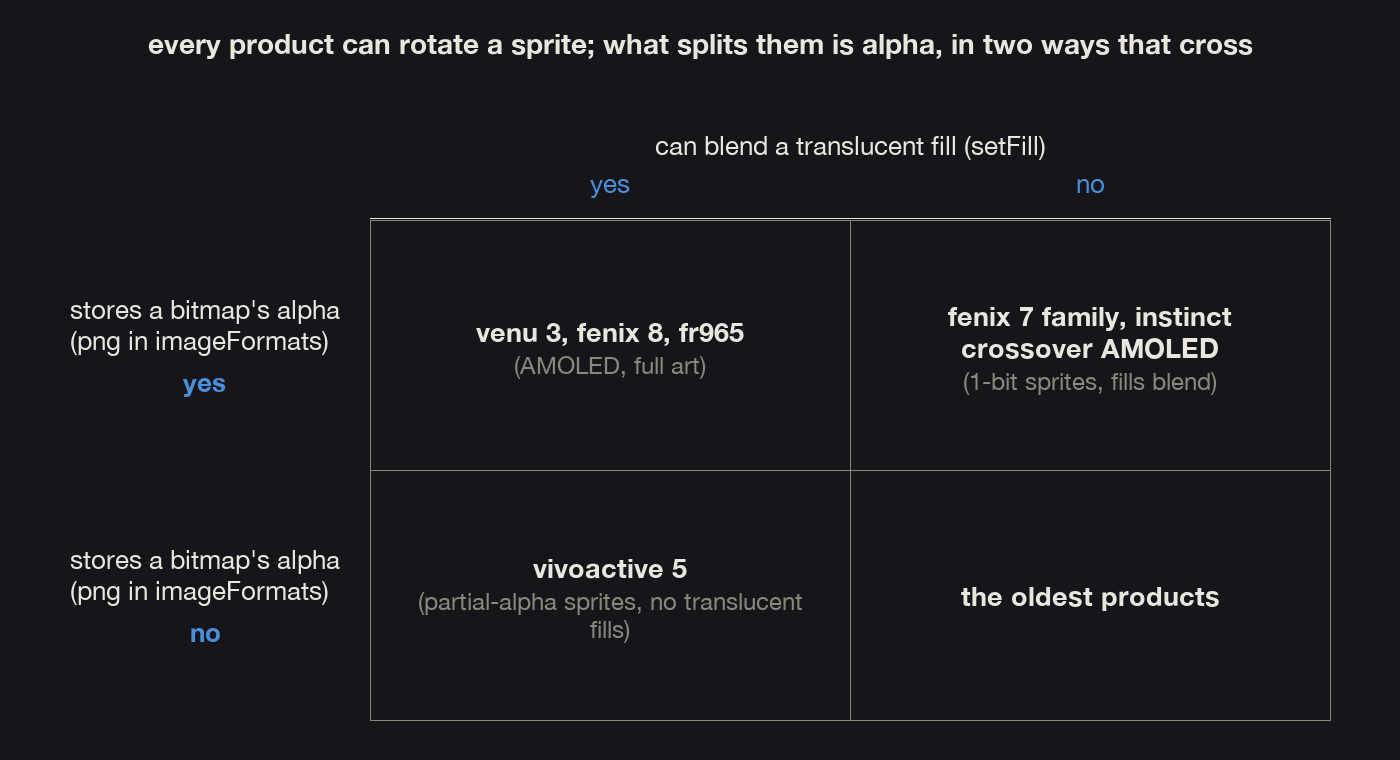
One more finding from the same month. Two capabilities decide what art a watch can show, both of them are about alpha, and a watch can have either one without the other. Every product I ship to can rotate a sprite, so rotation is not what divides them.
- Blending a translucent fill. That is
setFill, and it followsenhancedGraphicSupport. - Storing a bitmap's alpha channel at all. That is
imageFormatscontainingpng.
vivoactive5 stores alpha and has no translucent fills. The fenix 7 family and the Instinct Crossover AMOLED blend fills and store only 1-bit alpha, so their art goes in with no alpha plane. A fill needs the first capability, a soft-edged sprite needs both.
On the products that cannot blend a translucent fill the capability checks
still come back true. Gfx has :ALPHA_BLENDING_FULL and the checks
around it guard nothing there. dc has :setFill is the only one I
have found that gets it right.
So the only test that finds this is a render. Put the same face on vivoactive5 and on vivoactive6, same screen family, same art, and subtract one frame from the other. Skeleton Bridge differed by 33,229 pixels. The steel went dark and the gold balance vanished, and it had been shipping like that.
The alpha split is also why the night frame is composed out of parts that are already resident for the lit dial, instead of being flattened into one picture. Nothing has to load when the watch dims, and nothing has to load when you raise your wrist. The train can still turn overnight, and a colourway can still recolour it.

What I check now
Most of these questions have an answer sitting in the SDK on your own machine, one folder per device. Two files hold nearly all of it.
compiler.jsoncarriesdeviceFamily,displayType,enhancedGraphicSupport,alphaBlendingSupport,imageFormatsandmemoryLimit. That covers the alpha split and the heap ceiling with no guessing.simulator.jsoncarriesgraphicsResourcePoolSizeandwatchdogCount, so the pool and the watchdog sit in one file. The watchdog counts VM statements rather than milliseconds, so a frame can finish quickly and still be killed.
On top of those I keep three small tools.
- One reads a face's own manifest and prints every product it ships to with its pool and its layer count, tightest first.
- One prices every drawable against each product's pool figure, and that is what points me at the product to look at.
- One patches itself into the engine's update for a single run, so any face reports its real free pool on the wake frame without its own code being touched.
Running that on every product a face ships to takes a morning. I treat it as certification, because measuring one device is what put the second black dial in the field.
Three things the simulator will not show you.
- A face being uncovered on a panel that is still dark, which is the whole of the third bug.
- The reduced watchdog budget of low-power mode, a few thousand statements against the active figure. The worst crashes come from there.
- Compositing. Its blit is a synchronous copy, while a real GPU composites the
screen when
onUpdatereturns. So a texture cleared and repainted later in the same call gets sampled half-drawn on a wrist. On a Mac it never is.
Three reports of the same photograph, and three different faults under them. A bitmap the pool had thrown away while my code held a handle that owned nothing. A pool with 96 kB left on the frame nobody measures. And a watch a little slower to light its screen than its sibling. What settled the third was a build with a switch in it, sent to the tester whose watches were failing. Give people the thing that measures. Do not hand them the number you believe. That is the rule the rest of this workshop runs on.
The author builds the My Day 24 watch face family. Published 2026-09-09.